
My Aircraft
Under My aircraft in your profile you manage the aircraft you fly: how they appear in WeGlide Live and in OGN apps, which devices they carry, and which one is connected to your profile.
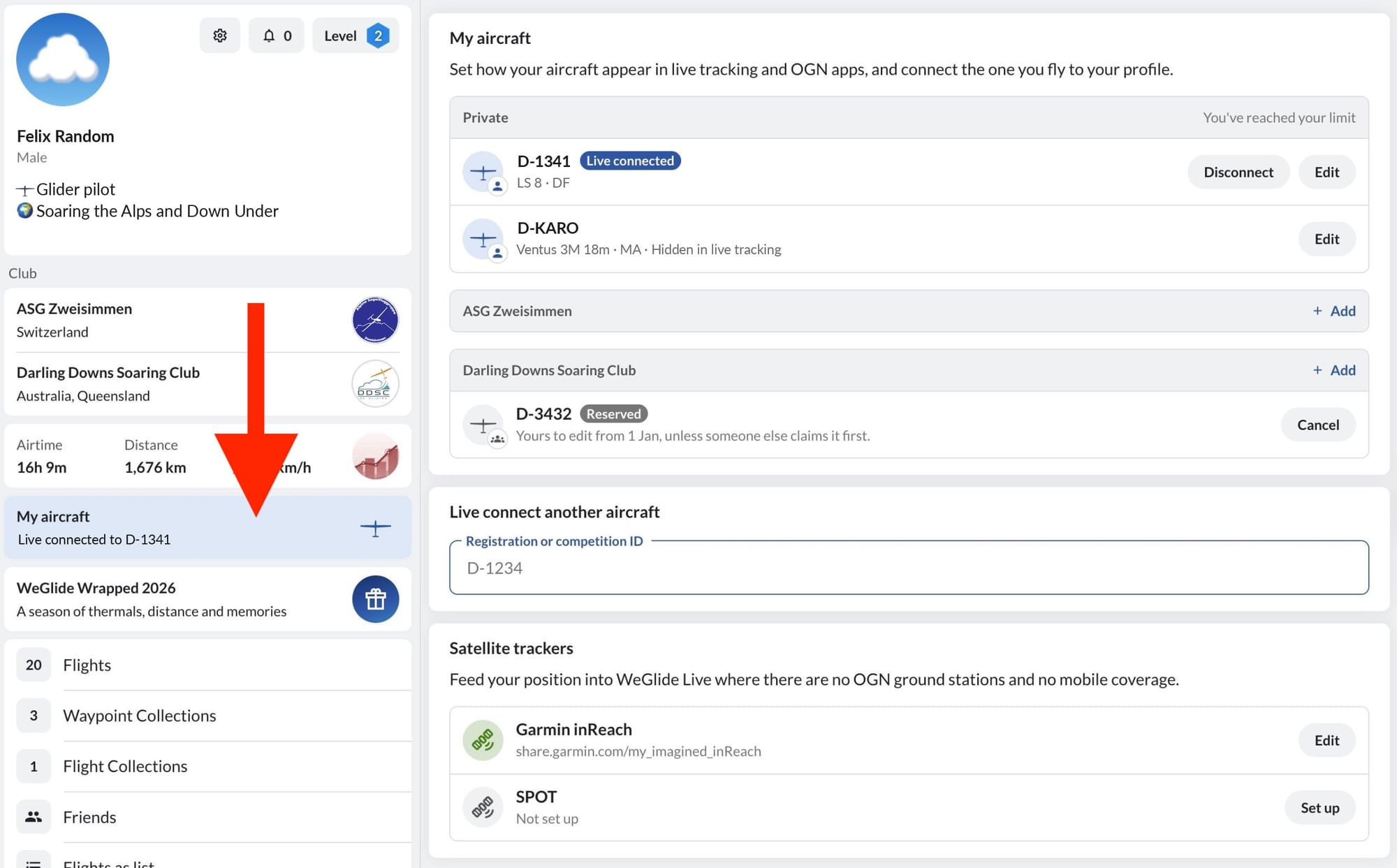
My aircraft replaces the OGN Device Database. You no longer need an entry there: aircraft and devices are registered and edited in WeGlide.
Private and club aircraft
Your aircraft are grouped under Private and under each club you are a member of.
- A private aircraft is yours alone to edit.
- A club aircraft belongs to its club. Every member of the club sees it and can connect to it.
Whether an aircraft is private or belongs to a club is settled when it is added. To change it, remove the aircraft and add it again.
Add an aircraft
Click Add next to Private or next to your club, then pick an aircraft you have already flown or type its registration. What happens next depends on the aircraft:
- You have flown it. If you uploaded a flight with it to WeGlide before 2 November 2026, it is added at once and you can edit it.
- You have not flown it. It is Reserved for you. From 1 January 2027 you can edit it, unless a pilot who has flown it claims it first.
- WeGlide does not know it yet. You register it with its aircraft model and at least one device.
- Someone else already has it. If you bought it, ask the previous owner to remove it. Otherwise write to info@weglide.org.
You can add up to 5 private and 20 club aircraft, and no more than 30 aircraft within 12 months. Who added an aircraft is not shown to other pilots.
Edit an aircraft
With Edit you set:
- the aircraft model and competition ID,
- its devices: up to two, one each of FLARM, OGN tracker or ICAO address,
- whether it is shown in live tracking at all,
- whether its registration and competition ID are shown. Without them, WeGlide Live does not show the aircraft and OGN apps show it anonymously.
These settings apply to WeGlide Live and to OGN apps. FLARM warnings in the cockpit are not affected.
Remove aircraft takes the aircraft off your list. Its devices stay registered and live tracking keeps working. If you move your FLARM to another aircraft, remove the device first.
Who can edit a club aircraft
- The member who added it.
- Any other member of the club, 30 days after uploading a flight with that aircraft for the club.
Members who cannot edit an aircraft yet can still connect to it. If you leave the club, its aircraft leave your list, including the ones you added.
Connect
Connect links an aircraft to your profile, so you appear in live tracking by name and with your declared task. By default a private aircraft stays connected until you disconnect it and a club aircraft for a week. You can change the duration when connecting.
To connect to an aircraft that is not on your list, search for it under Live connect another aircraft. See Connect to a Glider for details and Satellite Trackers for Garmin inReach and SPOT.
Excluded motor gliders
Some touring motor gliders are not shown in live tracking, because they often fly with their engine running and cannot be scored reliably. The list is maintained by WeGlide:
- Alexander Schleicher ASK 16
- Diamond Aircraft Dimona
- Diamond Aircraft H36 Dimona
- Diamond Aircraft HK36 Super Dimona
- Distar SunDancer
- EEL ULF-2
- Fournier RF 4
- Fournier RF-10
- Fournier RF-5
- Fournier RF-5B
- Gramex Song
- Grob Aircraft G 109
- Grob Aircraft G 109 B
- M&D Flugzeugbau Samburo AVo68-R
- Pipistrel Sinus
- Scheibe-Flugzeugbau SF 25 C (2000)
- Scheibe-Flugzeugbau SF 25 E
- Scheibe-Flugzeugbau SF 25A Falke
- Scheibe-Flugzeugbau SF 25B Falke
- Scheibe-Flugzeugbau SF 25C-S Falke 76
- Scheibe-Flugzeugbau SF 28 A
- Scheibe-Flugzeugbau SFS 31
- Sonex Aircraft Sonex Xenos
- Urban Air Lambada UFM-13
- Urban Air Lambada UFM-15
- Valentin Flugzeugbau Taifun 17e
For developers
OGN apps can download all registered devices in the format of the OGN Device Database. See Developers.